arrow_back All Industries
Elegant restaurant interior with set dining tables
Industry Solutions / Restaurant

Restaurant POS
Built for Service.

Table management, kitchen display integration, and split-bill functionality all from one SQL-backed POS system built for restaurants that run from lunch service straight through to last orders.

Contact Expert View Rentals
Dinner Service, 19:45
SEATS 14/18
Table 4 - Main Course R648.00
Table 7 - Desserts x3 R285.00
Table 11 - Bill Split x4 R1 240.00
Today Restaurant
Covers
74
Avg Spend
R318
KDS Tickets
22
Built for Restaurant

Six Features That Run
Your Restaurant.

Purpose-built modules that address the real operational demands of restaurant businesses in South Africa.

restaurant_menu

Table Management

Assign servers to sections, track every table's status in real time, and manage walk-ins alongside advance reservations from a single floor-plan view. Move items between tables, merge covers, and handle partial payments without losing any order detail or creating confusion at the till.

display_settings

Kitchen Display System

Orders fire directly from the POS to a kitchen display screen the moment a server confirms the table order, eliminating printed ticket clutter and verbal miscommunication. The KDS prioritises by table seating time, highlights allergen flags, and timestamps every dish so you can measure service speed and identify bottlenecks during peak covers.

receipt_long

Split Bill and Course Management

Split any bill evenly, by item, or by custom amounts without recalculating manually. Hold starters while mains are being prepared, fire courses on the server's cue, and print separate receipts per diner. Corporate expense diners and group bookings both handled without the awkward end-of-evening shuffle.

inventory_2

Menu and Modifier Management

Build modifiers for cooking preferences, sauce choices, and portion upsells directly into each menu item. Modifiers prompt the server at the time of ordering, ensuring the kitchen receives complete specifications on every ticket. Seasonal menu changes are applied from one central screen and update every terminal simultaneously.

bar_chart

Sales and Menu Reporting

Identify your highest-margin dishes, track cover counts by day part, and compare server performance across a shift or a month. Reports are generated directly from the SQL database, meaning data is consistent, not sampled, and exportable to your accountant in formats compatible with SARS e-filing requirements.

loyalty

Loyalty and Repeat Guest Profiles

Build guest profiles that track dining frequency, preferred tables, dietary notes, and spend history. Use this data to reward loyal diners with points-based vouchers, offer personalised birthday promotions, and reduce churn during the quieter mid-week periods typical of Cape Town restaurant seasonality.

Why TimeWorks

Built for
South African business.

25 years of South African retail and hospitality experience drives every module. The system is designed around the realities of trading in South Africa, including load shedding resilience, rand-based reporting, and local compliance requirements.

25+
Years in SA Retail
SQL
Backed Architecture
700+
SA Businesses
speed

Faster Table Turns

Integrated KDS and split-bill processing reduces the time between seating and bill settlement, letting you turn tables faster without rushing the guest experience.

payments

Complete Payment Flexibility

Accept cash, card, QR payments, and vouchers at the table or counter. Foreign currency conversion and multiple tender types on a single bill are all handled natively.

cloud_off

Load Shedding Resilience

Local SQL database architecture means the POS keeps processing orders and payments during loadshedding, with automatic sync when connectivity restores. No cloud dependency at the till.

receipt_long

Rental Options Available

No large capital outlay required. Rental packages include hardware, software, setup, and ongoing support, ideal for businesses managing cashflow through growth phases.

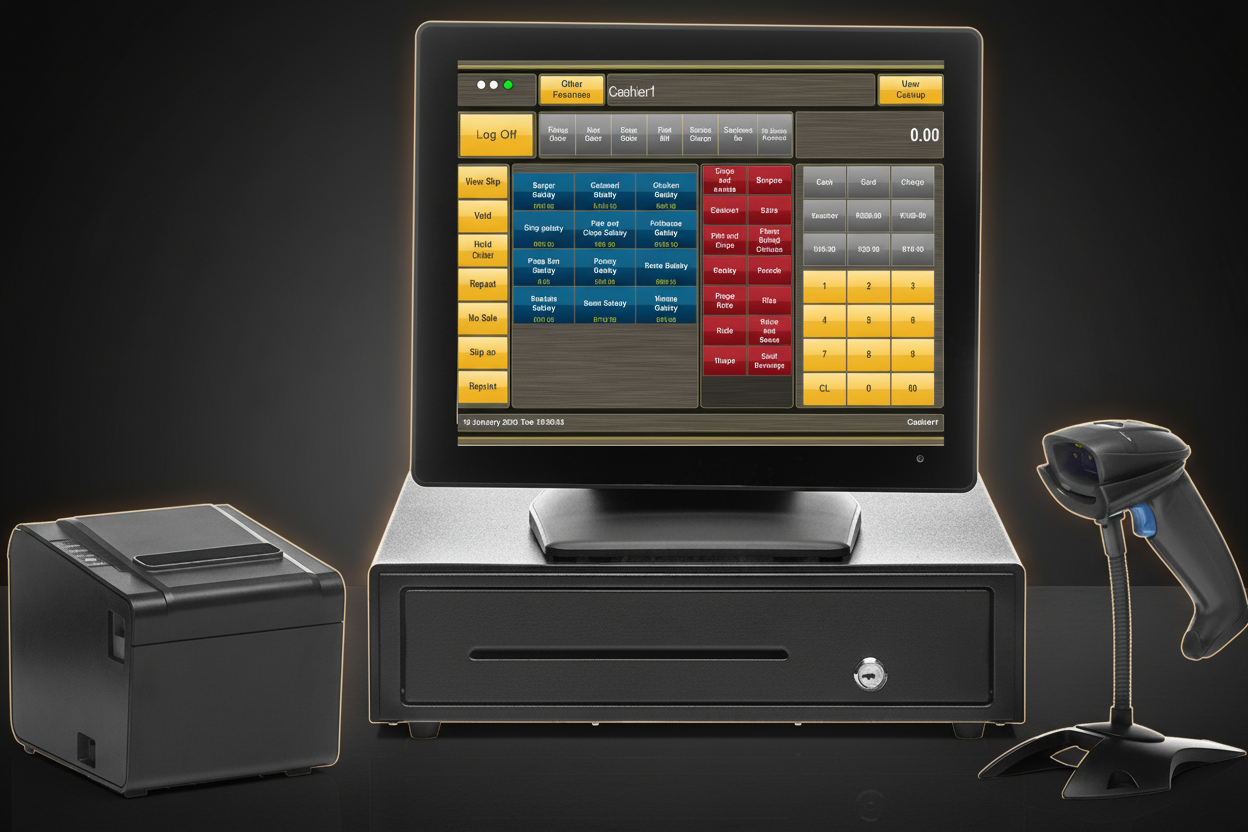
TimeWorks POS full setup showing restaurant and hospitality menu items on screen
storefront TimeWorks in the Wild

Real Restaurant Setup.
Real Results.

This is a real TimeWorks terminal configured for restaurant service. Full menu loaded with categories, modifiers, and pricing. Cash drawer, receipt printer, and barcode scanner all integrated. Orders flow straight from the POS to the kitchen display.

Our POS rental programme means you get the full terminal setup without capital outlay. Daily, weekly, or monthly terms available, with full support included.

point_of_sale Explore Rentals Get a Custom Quote
25+

Years in SA Hospitality

Trusted by restaurant operators across South Africa since 1999.

R99

Daily Rental Available

Full POS terminal with KDS integration, no capital outlay required.

24/7

Service Hour Support

Restaurants trade evenings and weekends. Our support matches yours.

Common Questions

Restaurant-specific questions about TimeWorks POS.

Restaurant POS pricing in South Africa varies significantly based on the number of terminals, kitchen display screens, and whether you choose a purchase or rental model. TimeWorks offers rental packages starting from a single-terminal setup, with monthly fees that include hardware, software, installation, training, and ongoing support. There are no hidden per-transaction fees. For a mid-sized restaurant running two service terminals and one kitchen display, most clients find the rental model more cost-effective than a capital purchase during the first three years. Contact us for a tailored quote based on your specific covers, trading hours, and integration requirements.
Yes. TimeWorks tracks each table through its full lifecycle, from reservation through seating to payment, and provides a live floor-plan view that shows table status at a glance. The system stores advance reservations with guest contact details, covers count, and special requirements. On a busy Friday night, your host can see exactly which tables are being cleared, which are ready to seat, and how long seated tables have been occupied, helping you time the next seating correctly and avoid keeping reservations waiting unnecessarily.
TimeWorks supports integration with third-party online ordering systems and can receive orders directly into the POS queue so that takeaway and delivery orders are treated the same as in-house orders at the kitchen display. This means your kitchen sees one prioritised stream of tickets regardless of order origin, preventing the chaos of managing a separate tablet for every delivery platform. Speak to our team about your specific platform requirements and we will confirm compatibility and setup requirements for your restaurant.
Yes. TimeWorks POS stores guest profile data, including names, contact numbers, and dining history, within a local SQL database on your own hardware. No guest data is transmitted to or stored on third-party cloud servers without your explicit configuration. This architecture gives you direct control over your data to comply with the Protection of Personal Information Act. Your guest database remains your asset, and we provide guidance on data retention policies, access controls, and the data subject access request process as part of the initial setup and training.
Get Started

Ready to Upgrade Your Restaurant?
Talk to an Expert.

Talk to a TimeWorks specialist about your restaurant layout, cover count, and kitchen workflow. Rental and purchase options available with full setup, staff training, and ongoing support.

support_agent Contact Expert receipt_long View Rentals
EXPLORE MORE

Related Solutions

All Industries POS Software POS Hardware Rental Plans
Fast Food and QSR POS VIEW arrow_forward Coffee Shop POS VIEW arrow_forward Pub POS VIEW arrow_forward