Every busy kitchen has its war stories. The docket that fell behind the fryer. The handwriting so illegible that the chef plated chicken when the table ordered fish. The grease-splattered ticket that disintegrated before the pass was cleared. Paper order systems have served the hospitality industry for decades, but they have also cost it millions in remade dishes, dissatisfied guests, and table turns that went two covers slower than they should have. Kitchen Display Systems exist to solve this problem at the root. In 2026, there is no credible reason for a professional kitchen to still be running paper tickets.
This article explains exactly what a KDS is, how it integrates with your POS system, what workflow benefits it delivers, and how to calculate the return on investment for your Cape Town restaurant.
The Paper Ticket Problem
Paper dockets seem simple, but in a commercial kitchen environment they accumulate failure modes that compound under pressure. Heat and moisture warp thermal paper within minutes of printing: a table's full order can become unreadable before it reaches the chef. Busy service creates a physical pile-up at the pass: tickets from table four, six, and eleven land simultaneously, and the sequence gets disrupted the moment someone shuffles the stack. There is no automatic timer telling the expediter how long ticket nine has been sitting. There is no alert when a dish has been in the queue for fifteen minutes.
When a waiter modifies an order after it has already been sent (a common scenario in any sit-down environment), the paper system requires a second verbal or physical handoff to the kitchen. If communication breaks down at that moment, the modification never reaches the cook. The result is a wrong dish, a refire, and a guest who has watched other tables around them finish their meals while their food is remade. In a Cape Town restaurant doing 80 covers on a Friday night, that chain of events is not an edge case: it is a regular occurrence.
"Lost tickets and wrong orders are not kitchen problems: they are system problems. Paper is the system that's failing you."
TimeWorks: Hospitality POS Implementation, Western Cape
What Is a Kitchen Display System?
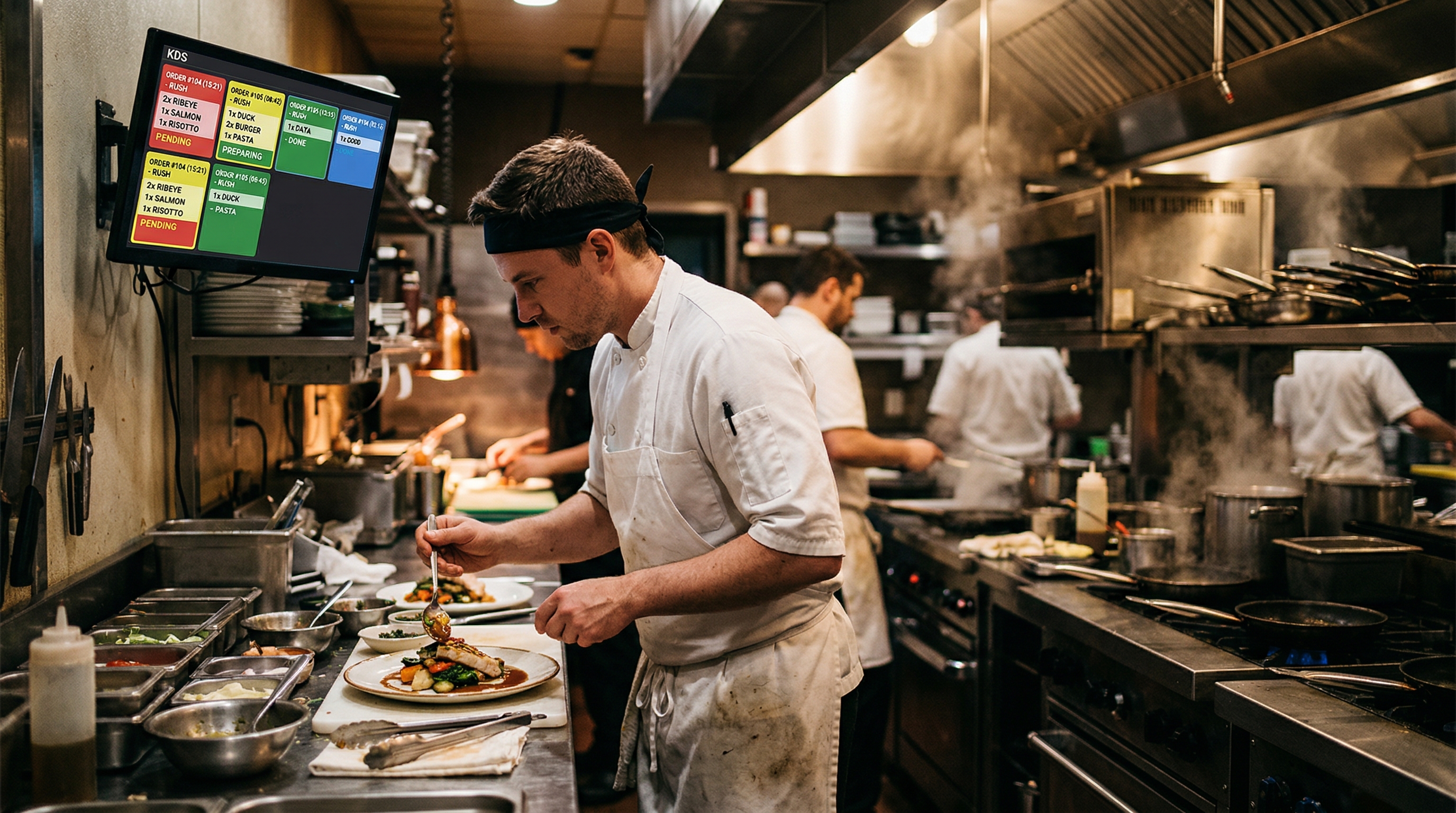
A Kitchen Display System is a commercial-grade screen (typically mounted at the pass, above a prep station, or at the bar) that replaces paper tickets with a real-time digital order queue. Orders appear on the screen the instant a waiter submits them at the POS terminal, with no printing delay and no physical handoff required. Each order card shows the table number, the items ordered, any modifiers or dietary requirements, and a running timer indicating how long the order has been active.
When a dish is ready, the kitchen team acknowledges it with a single tap on the touchscreen or a press of the bump bar, a dedicated input device with large, tactile buttons that can be operated with wet or gloved hands. The acknowledged item is removed from the queue or flagged as complete, giving the expediter a clean, live view of exactly what is outstanding at any moment. No paper, no ambiguity, no lost dockets.
The hardware itself is purpose-built for kitchen environments: sealed against moisture and grease ingress, rated for the temperature swings between a cold prep area and a hot line, and designed with high-brightness displays that remain readable under commercial kitchen lighting. A KDS screen that goes dark during a Friday service is not acceptable, which is why commercial-grade units are built to standards that consumer tablets simply cannot meet.
How KDS Integrates With Your POS
The value of a KDS multiplies significantly when it is natively integrated with your POS system rather than bolted on as an afterthought. In a properly integrated setup, the workflow is seamless: a waiter takes an order at the table using a handheld terminal or a fixed POS station, presses send, and the order appears on the relevant kitchen screen within milliseconds. No printer, no paper, no relay through a manager.
Station routing is one of the most operationally significant features of a well-integrated KDS. Rather than sending the entire table order to a single screen, the POS routes each item to the station responsible for it: starters to the cold prep section, mains to the hot line, desserts to the pastry station. A table of four placing a complex order sees only the relevant items on each station's screen, reducing visual clutter and preventing the common error where a cook misses their section's items because the ticket is cluttered with items from other stations.
Course management allows waiters to fire courses in sequence from the POS. A starter order is sent immediately; mains are held at the POS and released to the kitchen screen only when the waiter fires them, ensuring the kitchen is not plating mains before the table has finished their starters. This level of coordination, which requires constant verbal communication with paper systems, becomes automatic with a POS-integrated KDS.
Order modifications update live on the screen. If a guest changes their steak from medium to well-done after the order has been sent, the waiter edits the order at the POS and the KDS card updates immediately, flagged visually so the cook on the hot line knows a modification has come in.
Key Benefits: Speed, Accuracy, and Visibility
The operational benefits of a KDS implementation are measurable and consistent across kitchen environments of all sizes. The most immediate impact is on order accuracy. With every order arriving digitally (typed at the POS, not transcribed by hand), the source of most kitchen errors is eliminated. The chef reads exactly what the waiter entered. Modifiers, dietary requirements, and special requests are displayed consistently, in the same position on every order card, rather than scrawled in variable shorthand at the bottom of a docket.
Cook time visibility is the second major operational shift. Every order card has a timer running from the moment the order hits the screen. Managers and expediters can see at a glance which orders are within target cook time and which are approaching or exceeding the threshold. Some KDS systems colour-code cards: green for on track, amber for approaching the limit, red for overdue. This gives the expediter an instant visual dashboard without needing to check any secondary system.
-
Order Accuracy Orders arrive digitally typed: no transcription errors, no illegible handwriting, no grease-damaged dockets that become unreadable mid-service.
-
Cook Time Alerts Built-in timers flag orders approaching or exceeding target cook times, giving expediters real-time visibility before a delay becomes a complaint.
-
Course Management Fire courses from the waiter's POS terminal in sequence: starters, mains, and desserts each reach the kitchen only when the table is ready for them.
-
Dietary Alerts Allergen flags and dietary requirements entered at the POS appear prominently on the KDS card, reducing the risk of serving the wrong dish to a guest with dietary restrictions.
-
Station Routing Each item is routed to the relevant kitchen station automatically: hot line, cold prep, pastry, bar, reducing visual clutter and eliminating cross-station confusion.
Fast-Food vs Fine Dining: Different Workflows, Same Gains
KDS technology is not the exclusive domain of fine dining. In fact, quick-service and fast-casual operations often see the sharpest ROI from a KDS implementation because their kitchen velocity is higher and the cost of a single lost order (in a queue that processes hundreds of transactions per hour) is proportionally greater.
In a quick-service environment, the KDS functions primarily as a high-throughput order queue. Items appear, are prepared, and are bumped off in rapid succession. The key metric here is queue clearance time: how quickly the kitchen processes each card. A well-configured KDS surfaces bottlenecks in real time: if cards are stacking up at the burger station while the wrap station is clear, the manager can redistribute labour immediately, before a backlog causes customer-facing delays.
In a fine dining environment, the KDS earns its value through course management and order precision. A table of eight with multiple dietary requirements, special requests, and a tasting menu that fires course by course requires coordination that paper tickets cannot reliably provide. The KDS becomes the single source of truth for the kitchen: every cook on the pass works from the same live information, updated in real time, with no ambiguity about what has been modified, what has been sent, and what is on hold.
For a mid-market Cape Town restaurant (the kind doing 60 to 120 covers per service in a V&A Waterfront or De Waterkant setting), the KDS occupies the sweet spot between these two extremes. Course management is important, but so is throughput. The system needs to be fast enough to keep up with service pressure while giving the front-of-house team the precision tools to deliver a polished dining experience.
TimeWorks KDS Integration
TimeWorks KDS integrates directly with our SQL-backed POS platform, which means orders flow from waiter terminals to kitchen screens through the same database that handles your entire operation. No middleware layer, no third-party sync tool, no latency introduced by an external API call. When a waiter submits an order at a table, that order is committed to the SQL database and simultaneously pushed to the relevant KDS screen. In a local network environment, the round-trip time is under 100 milliseconds, effectively instant from the kitchen's perspective.
The system supports both touchscreen interaction and bump-bar input. Touchscreen operation suits environments where the KDS is mounted within easy arm's reach and kitchen staff have the time and space to interact with the screen directly. Bump-bar operation is preferred in high-volume, fast-paced environments where staff need to acknowledge orders without breaking stride: the large tactile buttons of a bump bar can be pressed confidently with the back of a hand, a wrist, or through gloves.
Load shedding resilience is an important consideration for South African kitchens. TimeWorks KDS operates on the same local SQL server as your POS, which means when power returns after an outage, the KDS re-syncs instantly with the database. Orders that were active during the outage remain in the queue. There is no reconciliation process, no manually re-entering orders, and no ambiguity about which dockets were processed before the power went out. Your kitchen picks up exactly where it left off, from a screen that reflects the live database state.
| Input Method | Best For | Hygiene | Speed |
|---|---|---|---|
| Touchscreen | Fine dining, pastry, cold prep | Requires cleaning protocol | Fast with proximity |
| Bump Bar | Hot line, fast casual, high volume | Operable with gloves | Fastest: no reach required |
| Dual (Touch + Bump) | Full-service restaurant pass | Flexible | Highest versatility |
ROI: What a KDS Actually Pays Back
The financial case for a Kitchen Display System is built on three measurable line items: reduced food waste from fewer wrong orders and remakes, faster table turns from improved kitchen coordination, and reduced comps issued to dissatisfied guests.
Food waste reduction. Every remade dish is a double cost: the ingredients for the incorrect dish are written off, and the ingredients for the correct replacement are consumed. In a restaurant doing 80 covers per service, even a 2% error rate means roughly 1.6 dishes remade per service. At an average food cost of R85 per dish, that is R136 per service, or approximately R3,900 per month across 28 service days. A KDS that reduces the error rate to under 0.5% recovers the majority of that loss within the first month of operation.
Table turn improvement. Faster kitchen coordination means dishes arrive at tables sooner, guests finish and leave sooner, and the table is reset for the next cover. In a busy 70-seat Cape Town restaurant, shaving four minutes off the average cover time can mean fitting in an additional table turn per service at peak periods. At an average spend of R450 per cover, one additional table turn per service adds roughly R1,800 to weekly revenue, or over R7,000 per month.
Comp reduction. Comps (complimentary dishes issued to placate a guest whose order was wrong, delayed, or unsatisfactory) are one of the highest-cost failure modes in hospitality. A single comp on a main course at a mid-range Cape Town restaurant wipes out the margin on two or three other covers at that table. Fewer wrong orders mean fewer comps. The saving is harder to quantify precisely, but operators who have implemented KDS consistently report a measurable reduction in comps within the first 90 days.
Your Kitchen Deserves Better Than Paper
Paper tickets had their era. That era is over. A Kitchen Display System is not an expensive luxury for high-end restaurants: it is a standard operational tool that pays for itself in reduced waste, faster covers, and fewer unhappy guests. For a Cape Town kitchen dealing with load shedding, high staff turnover, and demanding diners who compare your service to every restaurant they have ever visited, the margin for operational error has never been smaller.
TimeWorks KDS integrates natively with our SQL-backed POS platform. There is no third-party hardware to wrestle with, no middleware that adds latency, and no reconciliation process after a power outage. Orders flow from your waiter's terminal to your kitchen screen in under 100 milliseconds, and they stay there (accurate, timed, and visible) until your kitchen team bumps them off. Setup is handled by our local Cape Town team, who have been implementing KDS solutions across the Western Cape for over two decades.
If your kitchen is still running paper tickets, we will show you what a KDS implementation looks like in a restaurant of your size, at a cost that makes commercial sense. The demo takes 30 minutes. The decision, once you have seen it running, tends to be straightforward.
See It Running in Your Kitchen Format
Tell us your kitchen layout, cover count, and service style and we will show you a working KDS demo configured for your operation: bump bar, touchscreen, station routing, and all. No obligation, no sales pressure.